deepdive
This guide is the practical companion to the main README. The README explains what llm.rb is. This document shows how to use it.
Mental Model
Everything in llm.rb builds on three concepts:
- Provider: the model backend
- Context: the execution state
- Tools: external work the model can request
Most features extend these, rather than introducing new abstractions.
Contents
- Providers
- Responses
- Streaming
- Reasoning
- Structured Outputs
- Persistence
- Tools
- Agents
- Skills
- MCP
- A2A
- Multimodal Prompts
- Retrieval And Files
- Tracing
- Production And Operations
- Putting It Together
Providers
Start with a provider and a context. From there, you can add schemas, tools, MCP, persistence, streaming, and other features without changing the overall shape of the code.
In llm.rb, LLM::Context is the main execution boundary. It keeps message
history, provider params, tool state, and usage together, so you can keep
building on the same object instead of switching to a different abstraction
for each feature.
Those context-level defaults are not fixed. You can override them on a single
talk call by passing request params directly, which makes it
easy to keep stable defaults at the context level while changing things like
model, schema, tools, or stream for one turn.
Supported Providers
llm.rb supports multiple LLM providers behind one API surface:
- OpenAI (
LLM.openai) - Anthropic (
LLM.anthropic) - Google (
LLM.google) - DeepSeek (
LLM.deepseek) - xAI (
LLM.xai) - zAI (
LLM.zai) - Ollama (
LLM.ollama) - Llama.cpp (
LLM.llamacpp)
OpenAI-Compatible APIs
Many providers expose an OpenAI-compatible API without using OpenAI's exact
infrastructure or URL layout. In llm.rb, host: controls where requests go,
and base_path: controls the API prefix used to build endpoint paths.
For providers that keep OpenAI's usual /v1/... layout, overriding host: is
often enough:
llm = LLM.openai(
  key: ENV["DEEPSEEK_KEY"],
  host: "api.deepseek.com"
)
That said, if llm.rb has a native provider for the service, prefer that over
the generic OpenAI-compatible path. For example, LLM.deepseek(...) is the
better default for DeepSeek even though LLM.openai(host: "api.deepseek.com", ...)
can work too.
Some providers also change the base path. DeepInfra is one example: its
OpenAI-compatible API lives under /v1/openai/..., so both host: and
base_path: need to be set:
llm = LLM.openai(
  key: ENV["DEEPINFRA_TOKEN"],
  host: "api.deepinfra.com",
  base_path: "/v1/openai"
)
This same pattern also works for proxies, gateways, and self-hosted OpenAI-compatible servers that preserve the request schema but change the URL layout.
Basic Context
At the simplest level, any object that implements #<< can receive visible
output as it arrives. That includes $stdout, StringIO, files, sockets,
and other Ruby IO-style objects.
This is the smallest complete llm.rb loop: a provider, a context, and a place for streamed output to go. Once that is in place, the rest of the library builds outward from the same pattern:
#!/usr/bin/env ruby
require "llm"

llm = LLM.openai(key: ENV["KEY"])
ctx = LLM::Context.new(llm, stream: $stdout)

loop do
  print "> "
  ctx.talk(STDIN.gets || break)
  puts
end
Context defaults can still be overridden on a single turn. That is useful when most turns should share one setup, but a specific request needs a different model, schema, tool set, or stream target:
#!/usr/bin/env ruby
require "llm"

llm = LLM.openai(key: ENV["KEY"])
ctx = LLM::Context.new(llm, model: "gpt-4.1-mini", stream: $stdout)

ctx.talk("Answer normally.")
ctx.talk("Now return JSON.", schema: Report, stream: nil, model: "gpt-4.1")
Responses API
llm.rb also supports OpenAI's Responses API through LLM::Context with
mode: :responses. The important switch is store:. With store: false, the
Responses API stays stateless while still using the Responses endpoint. With
store: true, OpenAI can keep response state server-side and reduce how much
conversation state needs to be sent on each turn.
Use this when you want the Responses API specifically, not just normal chat completions. llm.rb keeps it behind the same context interface so the rest of your application code does not need to change much:
#!/usr/bin/env ruby
require "llm"

llm = LLM.openai(key: ENV["KEY"])
ctx = LLM::Context.new(llm, mode: :responses, store: false)

ctx.talk("Your task is to answer the user's questions", role: :developer)
res = ctx.talk("What is the capital of France?")
puts res.content
Responses
The response side follows the same idea as the rest of llm.rb. APIs that make
model requests return
LLM::Response
objects as a common base shape, then layer on extra behavior when an endpoint
or provider needs something more specific.
That base wrapper still keeps the raw Net::HTTPResponse on response.res,
so normalization does not cut you off from low-level HTTP access when you need
to inspect headers, status, or other transport details.
Some response adapters also add Enumerable, so list-style and search-style
results can often be iterated directly without reaching into response.data.
Streaming
Streaming ranges from plain visible output to structured callbacks that can drive tool execution while the model is still responding.
The simple form is just an object that implements #<<. The advanced form is
LLM::Stream, which gives you explicit callbacks for visible output,
reasoning output, and tool-call lifecycle events.
Basic Streaming
At the lowest level, any object that responds to #<< can receive visible
output chunks.
This is the easiest way to make the model feel responsive. It works well for CLI tools, logs, and any interface where plain visible output is enough:
#!/usr/bin/env ruby
require "llm"

llm = LLM.openai(key: ENV["KEY"])
ctx = LLM::Context.new(llm, stream: $stdout)
ctx.talk("Explain how TCP keepalive works in one paragraph.")
puts
Advanced Streaming
Use LLM::Stream when you want structured callbacks
such as on_content, on_reasoning_content, on_tool_call, and
on_tool_return.
This is the version to use when streaming is part of control flow, not just presentation. It lets your code react to output, reasoning, and tool events as they happen:
#!/usr/bin/env ruby
require "llm"

class Stream < LLM::Stream
  def on_content(content)
    $stdout << content
  end

  def on_reasoning_content(content)
    $stderr << content
  end

  def on_tool_call(tool, error)
    $stdout << "Running tool #{tool.name}\n"
    queue << (error || ctx.spawn(tool, :thread))
  end

  def on_tool_return(tool, result)
    if result.error?
      $stdout << "Tool #{tool.name} failed\n"
    else
      $stdout << "Finished tool #{tool.name}\n"
    end
  end
end

llm = LLM.openai(key: ENV["KEY"])
stream = Stream.new
ctx = LLM::Context.new(llm, stream:, tools: [System])

ctx.talk("Run `date` and `uname -a`.")
ctx.talk(ctx.wait(:call)) while ctx.functions?
If tool work is already queued by the stream, just call wait.
Do not pass [:thread, :ractor] or similar lists for queued stream work.
The queue already knows what it contains and will wait on it correctly.
Stream Compaction Events
Long-lived contexts can compact older history into a summary through
LLM::Compactor.
When a stream is present, that lifecycle is exposed through
LLM::Stream with
on_compaction and on_compaction_finish. The compactor can also use its own
model: when you want summarization to run on a different model from the main
context. token_threshold: accepts either a fixed token count or a
percentage string like "90%", which resolves against the current model
context window and triggers compaction once total token usage goes over that
percentage.
This is useful when you want to log or surface the moment a context is compacted without treating compaction as a tool call:
#!/usr/bin/env ruby
require "llm"
class Stream < LLM::Stream
def on_compaction(ctx, compactor)
$stdout.puts "Compacting #{ctx..size} messages..."
end
def on_compaction_finish(ctx, compactor)
$stdout.puts "Compacted to #{ctx..size} messages."
end
end
llm = LLM.openai(key: ENV["KEY"])
ctx = LLM::Context.new(
llm,
stream: Stream.new,
compactor: {
token_threshold: "90%",
retention_window: 8,
model: "gpt-5.4-mini"
}
)
Stream Transform Events
Context transformers can also surface lifecycle events through
LLM::Stream. This is a
good fit for UI messaging around request rewriting, such as showing that data
is being anonymized before the request goes out:
#!/usr/bin/env ruby
require "llm"

class Stream < LLM::Stream
  def on_transform(ctx, transformer)
    $stdout << "Anonymizing your data...\n"
  end

  def on_transform_finish(ctx, transformer)
    $stdout << "Data anonymized.\n"
  end
end

class ScrubPII
  def call(ctx, prompt, params)
    [prompt, params]
  end
end

llm = LLM.openai(key: ENV["KEY"])
ctx = LLM::Context.new(llm, stream: Stream.new, transformer: ScrubPII.new)
ctx.talk("Email me at developer@example.com")
Manual Compaction
You can also assign a compactor to a context and manage compaction manually.
If you do not configure message_threshold: or token_threshold:, automatic
compaction stays disabled and you can call compact! yourself when the
workflow decides it is time:
ctx = LLM::Context.new(llm)
ctx.compactor = {retention_window: 8, model: "gpt-5.4-mini"}

# ...later...
ctx.compactor.compact!
Percentage Token Thresholds
token_threshold: can be a percentage string like "90%". In that form,
llm.rb resolves the threshold against ctx.context_window and compares the
resulting token count to the current usage.total_tokens. This is useful when
you want compaction to begin near the edge of the model's real context window
without hard-coding a provider-specific token count.
Plainly: "90%" means compaction starts once total token usage goes over 90%
of the context window.
If the context window is unknown and ctx.context_window returns 0, the
percentage threshold is treated as disabled. In that case, pair it with a
message_threshold: or use a fixed integer token_threshold: if you want a
fallback policy.
ctx = LLM::Context.new(llm, model: "gpt-5.4-mini")
ctx.compactor = {token_threshold: "90%", retention_window: 8}
Creating Your Own Compactor
If the built-in policy is not the right fit, create your own compactor by
subclassing LLM::Compactor.
The intended extension point is to implement both compactable? and
compact!:
#!/usr/bin/env ruby
require "llm"
class Compactor < LLM::Compactor
def compact?(prompt = nil)
ctx..size > 100
end
def compact!(prompt = nil)
return unless compact?(prompt)
summary = LLM::Message.new("user", "Summary goes here")
ctx..replace([summary, *ctx..last(8)])
summary
end
end
ctx = LLM::Context.new(llm)
ctx.compactor = Compactor.new(ctx)
Reasoning
Some providers expose model reasoning separately from visible assistant output. llm.rb lets you handle that in two ways: stream it as it arrives, or read it from the final response when the provider includes it.
This is part of the normal response model. Completion-style responses expose
reasoning_content, and streamed providers can emit reasoning incrementally
through LLM::Stream#on_reasoning_content.
Stream Reasoning Output
Use LLM::Stream#on_reasoning_content when you want reasoning output as a
separate stream.
If the provider emits reasoning incrementally, this lets you surface or log it without mixing it into the assistant-visible response stream:
#!/usr/bin/env ruby
require "llm"

class Stream < LLM::Stream
  def on_content(content)
    $stdout << content
  end

  def on_reasoning_content(content)
    $stderr << content
  end
end

llm = LLM.openai(key: ENV["KEY"])
ctx = LLM::Context.new(
  llm,
  model: "gpt-5.4-mini",
  mode: :responses,
  reasoning: {effort: "medium"},
  stream: Stream.new
)
ctx.talk("Solve 17 * 19 and show your work.")
Read Reasoning From The Response
When a provider includes reasoning content in the final completion, it is also available on the response object.
This is useful when you want the final response first and only inspect the reasoning afterward, for example in debugging or offline analysis:
#!/usr/bin/env ruby
require "llm"

llm = LLM.deepseek(key: ENV["KEY"])
ctx = LLM::Context.new(llm, model: "deepseek-reasoner")
res = ctx.talk("Solve 17 * 19 and show your work.")

puts res.content
puts res.reasoning_content
Structured Outputs
The LLM::Schema system lets you define JSON schemas for structured outputs.
Schemas can be defined as classes with property declarations or built
programmatically using a fluent interface. When you pass a schema to a
context, llm.rb adapts it into the provider's structured-output format when
that provider supports one.
The useful part is that the schema stays in Ruby. You describe the shape once, attach it to the context, and let llm.rb adapt it to the provider API instead of hand-writing JSON Schema payloads for each request:
#!/usr/bin/env ruby
require "llm"
require "pp"

class Report < LLM::Schema
  property :category, Enum["performance", "security", "outage"], "Report category"
  property :summary, String, "Short summary"
  property :impact, OneOf[String, Integer], "Primary impact, as text or a count"
  property :services, Array[String], "Impacted services"
  property :timestamp, String, "When it happened", optional: true
  required %i[category summary impact services]
end

llm = LLM.openai(key: ENV["KEY"])
ctx = LLM::Context.new(llm, schema: Report)
res = ctx.talk("Structure this report: 'Database latency spiked at 10:42 UTC, causing 5% request timeouts for 12 minutes.'")
pp res.content!
Fluent Schemas
If you do not want a class, you can build the schema inline.
This style is useful for one-off workflows or dynamic schemas that do not need their own constant:
#!/usr/bin/env ruby
require "llm"
require "pp"

schema = LLM::Schema.new.object(
  category: LLM::Schema.new.string.enum("performance", "security", "outage").required,
  summary: LLM::Schema.new.string.required,
  services: LLM::Schema.new.array(LLM::Schema.new.string).required
)

llm = LLM.openai(key: ENV["KEY"])
ctx = LLM::Context.new(llm, schema:)
res = ctx.talk("Structure this report: 'API latency spiked for the billing service.'")
pp res.content!
Persistence
Contexts can be serialized and restored across process boundaries. That gives you a straightforward way to persist long-lived conversation state between requests, jobs, retries, or deployments.
This works because LLM::Context already holds the state that matters:
messages, tool returns, usage, and provider-facing parameters. Persistence is
therefore mostly about choosing where to store that snapshot.
Save To A File
File-based persistence is the simplest way to see how context serialization works. It is useful for scripts, local tools, and any workflow where a JSON snapshot is enough.
#!/usr/bin/env ruby
require "llm"

llm = LLM.openai(key: ENV["KEY"])
ctx = LLM::Context.new(llm)
ctx.talk("Hello")
ctx.talk("Remember that my favorite language is Ruby")

payload = ctx.to_json

restored = LLM::Context.new(llm)
restored.restore(string: payload)
puts restored.talk("What is my favorite language?").content

ctx.save(path: "context.json")

restored = LLM::Context.new(llm)
restored.restore(path: "context.json")
puts restored.talk("What is my favorite language?").content
Persist With ActiveRecord
llm.rb has ActiveRecord support built in through acts_as_llm, which can be
applied to any ActiveRecord model. The built-in persistence contract is one
data column that stores the serialized runtime. Provider selection, model
selection, and any extra mirrored fields are application concerns that you
provide to llm.rb through provider:, context:, and tracer: hooks.
That means:
provider:should resolve anLLM::Providerinstancecontext:can inject defaults such asmodel:,mode:,store:, or tools- usage comes from the serialized runtime state through
ctx.usage, not from dedicated database columns - if your app wants
provider,model, or token columns, you can still add them and read them from your own hook methods
The wrapper persists LLM::Context as JSON. On PostgreSQL, you can store that
runtime state in a jsonb column instead of plain text:
format: :stringstores the context as a JSON string in a text column.format: :jsonorformat: :jsonbstores the context as a structured JSON object, which is useful for native JSON columns such as PostgreSQLjsonb. These formats expect a real JSON column type with ActiveRecord JSON typecasting enabled for the model.tracer:accepts a tracer or proc and assigns it throughllm.tracer = ...on the resolved provider. That sets the provider's default tracer so it keeps working across normal tasks, threads, and fibers that share the same provider instance. Usellm.with_tracer(...)when you want a temporary scoped override for the current fiber.provider:,context:, andtracer:can also be symbols that call methods on the model.
create_table :contexts do |t|
t.text :data
t.
end
require "llm"
require "net/http/persistent"
require "active_record"
require "llm/active_record"

class Context < ApplicationRecord
  acts_as_llm provider: :set_provider, context: :set_context, tracer: :set_tracer

  private

  def set_provider
    LLM.openai(key: ENV["OPENAI_KEY"]).persistent
  end

  def set_tracer
    LLM::Tracer::Logger.new(llm, io: $stdout)
  end

  def set_context
    {model: "gpt-5.4-mini", mode: :responses, store: false}
  end
end

ctx = Context.create!
ctx.talk("Remember that my favorite language is Ruby")
puts ctx.talk("What is my favorite language?").content
puts ctx.usage.total_tokens
If your app already has provider or model columns, wire them through your own hooks:
create_table :contexts do |t|
t.string :provider_name
t.string :provider_key
t.string :model_name
t.text :data
t.
end
require "llm"
require "active_record"
require "llm/active_record"

class Context < ApplicationRecord
  acts_as_llm provider: :set_provider, context: :set_context

  private

  def set_provider
    LLM.public_send(provider_name, key: provider_key)
  end

  def set_context
    {model: model_name, mode: :responses, store: false}
  end
end

ctx = Context.create!(provider_name: "openai", provider_key: ENV["OPENAI_KEY"], model_name: "gpt-5.4-mini")
ctx.talk("Remember that my favorite language is Ruby")
puts ctx.talk("What is my favorite language?").content
The acts_as_llm method wraps
LLM::Context and
provides full control over tool execution.
context: lets the model provide default options to the constructed
LLM::Context, while still allowing individual talk calls to
override them when a specific turn needs different behavior. One common use is
setting default tools:
#!/usr/bin/env ruby
require "llm"
require "net/http/persistent"
require "active_record"
require "llm/active_record"

##
# A small tool that gives the LLM access to the current time in UTC.
class Clock < LLM::Tool
  name "clock"
  description "Return the current UTC time"

  def call
    {time: Time.now.utc.iso8601}
  end
end

##
# The ActiveRecord model owns the serialized context and injects a default
# tool through `context:`.
class Context < ApplicationRecord
  acts_as_llm provider: :set_provider, context: :set_context, format: :jsonb

  private

  def set_provider
    LLM.openai(key: ENV["OPENAI_KEY"]).persistent
  end

  def set_context
    {model: "gpt-5.4-mini", tools: [Clock]}
  end
end

ctx = Context.create!
ctx.talk("What time is it in UTC right now?")
while ctx.functions?
  puts ctx.talk(ctx.wait(:call)).content
end
The acts_as_agent method wraps
LLM::Agent and manages
tool execution for you.
Its provider:, context:, and tracer: hooks can also be configured as
symbols that call methods on the model. It follows the same data-column-only
contract as acts_as_llm: provider instances come from your hooks, model
defaults come from agent DSL or context:, and usage comes from serialized
runtime state.
require "llm"
require "active_record"
require "llm/active_record"

class Ticket < ApplicationRecord
  acts_as_agent provider: :set_provider do
    model "gpt-5.4-mini"
    instructions "You are a concise support assistant."
    tools SearchDocs, Escalate
    concurrency :thread
  end

  private

  def set_provider
    LLM.openai(key: ENV["OPENAI_KEY"])
  end

  def set_context
    {mode: :responses, store: false}
  end
end

ticket = Ticket.create!
puts ticket.talk("How do I rotate my API key?").content
If your app already has provider or model columns, plug them into the same hooks:
create_table :tickets do |t|
t.string :provider_name
t.string :provider_key
t.text :data
t.
end
require "llm"
require "active_record"
require "llm/active_record"

class Ticket < ApplicationRecord
  acts_as_agent provider: :set_provider, context: :set_context do
    model "gpt-5.4-mini"
    instructions "You are a concise support assistant."
    tools SearchDocs, Escalate
    concurrency :thread
  end

  private

  def set_provider
    LLM.public_send(provider_name, key: provider_key)
  end

  def set_context
    {mode: :responses, store: false}
  end
end

ticket = Ticket.create!(provider_name: "openai", provider_key: ENV["OPENAI_KEY"])
puts ticket.talk("How do I rotate my API key?").content
Persist With Sequel
llm.rb has Sequel support built in through plugin :llm and plugin :agent,
which can be applied to any Sequel::Model. Their built-in persistence
contract is the serialized data column. Provider selection, model defaults,
and any extra mirrored fields are application concerns that you provide to
llm.rb through provider:, context:, and tracer: hooks. plugin :llm
persists LLM::Context, while plugin :agent persists LLM::Agent. On
PostgreSQL, that runtime state can be stored in a jsonb column instead of
plain text:
format: :stringstores the context as a JSON string in a text column.format: :jsonorformat: :jsonbstores the context as a structured JSON object, which is useful for native JSON columns such as PostgreSQLjsonb. These formats expect a real JSON column type with Sequel JSON typecasting enabled for the model.tracer:accepts a tracer or proc and assigns it throughllm.tracer = ...on the resolved provider. That sets the provider's default tracer so it keeps working across normal tasks, threads, and fibers that share the same provider instance. Usellm.with_tracer(...)when you want a temporary scoped override for the current fiber.provider:,context:, andtracer:can also be symbols that call methods on the model.
Migration:
create_table :contexts do
  primary_key :id
  String :data, text: true
end
require "llm"
require "net/http/persistent"
require "sequel"
require "sequel/plugins/llm"

class Context < Sequel::Model
  plugin :llm, provider: :set_provider, context: :set_context, tracer: :set_tracer, format: :jsonb

  private

  def set_provider
    LLM.openai(key: ENV["OPENAI_KEY"]).persistent
  end

  def set_tracer
    LLM::Tracer::Logger.new(llm, io: $stdout)
  end

  def set_context
    {model: "gpt-5.4-mini", mode: :responses, store: false}
  end
end

ctx = Context.create
ctx.talk("Remember that my favorite language is Ruby")
puts ctx.talk("What is my favorite language?").content
puts ctx.usage.total_tokens
context: lets the plugin inject default options into the constructed
LLM::Context. Those defaults still live at the context layer, so they can be
overridden on individual talk calls when a specific turn needs
different behavior. One common use is setting default tools this way, but the
same hook can also preload schemas, stream handlers, or other context-level
options:
#!/usr/bin/env ruby
require "llm"
require "net/http/persistent"
require "sequel"
require "sequel/plugins/llm"

##
# A simple tool that the LLM will call when it could answer
# a user's query. Its return value is consumed by the LLM.
class System < LLM::Tool
  name "system"
  description "Run a shell command"
  parameter :command, String, "Command to execute"
  required %i[command]

  def call(command:)
    {output: `#{command}`}
  end
end

##
# A sequel model that wraps an instance of LLM::Context. It is highly
# configurable but lets keep it simple :) The 'persistent' option opts
# into a process-wide net-http-persistent connection pool.
class Context < Sequel::Model
  plugin :llm, provider: :set_provider, context: :set_context

  private

  def set_provider
    LLM.openai(key: ENV["OPENAI_KEY"]).persistent
  end

  def set_context
    {model: "gpt-5.4-mini", tools: [System]}
  end
end

##
# We create a new record, then update the record every time we call
# 'talk' on the model.
ctx = Context.create
ctx.talk("What files are in my home directory?")
res = ctx.talk(ctx.functions.call)
puts res.content
Tools
Tools in llm.rb can be defined as classes inheriting from LLM::Tool or as
closures using LLM.function. The same execution model covers provider tool
calls, local tools, and MCP-exposed tools.
At the context level, tool execution is explicit. The model can request work, the context records pending functions, and your code decides when to execute them and feed the results back in.
Tool Calling
When the LLM requests a tool call, the context stores Function objects in
ctx.functions. call(:functions) executes the pending work and returns the
results to the model.
This explicit flow is one of the main design choices in llm.rb. The model can request work, but your code stays in control of when that work runs and how its results get fed back in:
#!/usr/bin/env ruby
require "llm"

class System < LLM::Tool
  name "system"
  description "Run a shell command"
  parameter :command, String, "Command to execute"
  required %i[command]

  def call(command:)
    {success: system(command)}
  end
end

llm = LLM.openai(key: ENV["KEY"])
ctx = LLM::Context.new(llm, stream: $stdout, tools: [System])
ctx.talk("Run `date`.")
ctx.talk(ctx.wait(:call)) while ctx.functions?
Stateful Tool Instances
Explicit tools: arrays can also include bound
LLM::Tool instances, not
just tool classes. That is useful when a tool needs to wrap local state such
as configuration, credentials, or an object from the surrounding application.
The execution model stays the same. The instance is adapted into a normal
tool call, so it still works with
LLM::Context,
ctx.functions, ctx.wait(:thread), ctx.wait(:task), ctx.wait(:fiber),
and streamed callbacks such as on_tool_call and on_tool_return. The
current :ractor mode still requires class-based tools:
#!/usr/bin/env ruby
require "llm"

class SearchDocs < LLM::Tool
  name "search_docs"
  description "Search a documentation index"
  parameter :query, String, "Query to search"
  required %i[query]

  def initialize(index:)
    @index = index
  end

  def call(query:)
    {results: @index.search(query)}
  end
end

llm = LLM.openai(key: ENV["KEY"])
ctx = LLM::Context.new(llm, tools: [SearchDocs.new(index: docs_index)])
ctx.talk("Search the docs for context compaction.")
ctx.talk(ctx.wait(:call)) while ctx.functions?
Cancelling A Function
Because pending tool calls are explicit LLM::Function objects, your code can
decide not to run them and return a cancellation result instead.
This is useful when tool execution depends on user confirmation, policy checks, or any other application-level gate. The model requests work, but your code can still stop it before the function actually runs:
#!/usr/bin/env ruby
require "llm"

class System < LLM::Tool
  name "system"
  description "Run a shell command"
  parameter :command, String, "Command to execute"
  required %i[command]

  def call(command:)
    {success: system(command)}
  end
end

llm = LLM.openai(key: ENV["KEY"])
ctx = LLM::Context.new(llm, tools: [System])

ctx.talk("Run `date` and `uname -a`.")

approved = ctx.functions.select do |fn|
  print "Run #{fn.name}? [y/N] "
  STDIN.gets.to_s.strip.downcase == "y"
end

returns = ctx.functions.map do |fn|
  if approved.include?(fn)
    fn.call
  else
    fn.cancel(reason: "user declined to run the function")
  end
end

ctx.talk(returns)
Cooperative Tool Interruption
ctx.interrupt! cancels the active provider request first, then notifies any
queued tool work through on_interrupt. This is cooperative cleanup, not
forced termination, so it is most useful for tools that manage local resources
such as subprocesses, sockets, or temporary files.
LLM::Context is still a stateful object and is best kept thread-local for
normal use. But interruption is a valid cross-thread control path. That makes
it a good fit for cases like a websocket, where one connection can carry many
messages and a later message may need to cancel an earlier in-flight request.
The basic request-cancellation path looks like this:
#!/usr/bin/env ruby
require "llm"
require "io/console"

llm = LLM.openai(key: ENV["KEY"])
ctx = LLM::Context.new(llm, stream: $stdout)
worker = Thread.new do
  ctx.talk("Write a very long essay about network protocols.")
rescue LLM::Interrupt
  puts "Request was interrupted!"
end
STDIN.getch
ctx.interrupt!
worker.join
Override on_interrupt on a tool when it needs to react to cancellation too:
#!/usr/bin/env ruby
require "llm"

class System < LLM::Tool
  attr_reader :pid

  name "system"
  description "Run a shell command"
  parameter :command, String, "Command to execute"
  required %i[command]

  def call(command:)
    @pid = spawn(command)
    Process.wait(pid)
    {success: $?.success?}
  end

  def on_interrupt
    Process.kill("TERM", pid) if pid
  end
end

llm = LLM.openai(key: ENV["KEY"])
ctx = LLM::Context.new(llm, tools: [System], stream: LLM::Stream.new)
Thread.new { ctx.talk("Run `sleep 30`.") }
sleep 0.5
ctx.interrupt!
Closure-Based Tools
For smaller cases, LLM.function gives you a closure-based alternative to
LLM::Tool:
This is useful when you want a quick function without defining a class. The
main limitation is that LLM.function does not register a tool class in
LLM::Tool.registry, so features that depend specifically on global
tool-class registration still only apply to normal LLM::Tool
subclasses. Generated MCP and A2A tools are request-local too; they are
not stored in the global LLM::Tool.registry or
LLM::Function.registry.
Request-local streamed tool resolution is no longer one of those limits:
LLM::Stream now resolves the current request tools first, so
LLM.function(...), MCP tools, bound tool instances, and normal tool classes
all work through the same streamed tool path:
#!/usr/bin/env ruby
require "llm"

weather = LLM.function(:weather) do |fn|
  fn.description "Return the weather for a city"
  fn.params do |schema|
    schema.object(city: schema.string.required)
  end
  fn.define do |city:|
    {city:, forecast: "sunny", high_c: 23}
  end
end

llm = LLM.openai(key: ENV["KEY"])
ctx = LLM::Context.new(llm, tools: [weather])
ctx.talk("What is the weather in Lisbon?")
ctx.talk(ctx.wait(:call)) while ctx.functions?
Concurrent Tools
Use wait(:thread), wait(:fiber), wait(:task), wait(:fork), or
experimental wait(:ractor) when you want multiple pending tool calls to run
concurrently. For CPU-intensive local work, llm.rb supports both :fork and
:ractor. :fork requires
xchan.rb support. The current
:ractor mode is intended for class-based tools and does not support MCP
tools, but mixed workloads can still route MCP tools and local tools through
different strategies at runtime. Class-based :ractor tools still emit
normal tool tracer callbacks, while :task, :fiber, or :thread may be a
better fit for I/O-bound work.
:fiber uses Fiber.schedule, so it requires Fiber.scheduler.
This matters when a turn fans out into several independent tool calls. Instead of blocking on each one in sequence, you can resolve them together and reduce end-to-end latency:
#!/usr/bin/env ruby
require "llm"

llm = LLM.openai(key: ENV["KEY"])
ctx = LLM::Context.new(
  llm,
  stream: $stdout,
  tools: [FetchWeather, FetchNews, FetchStock]
)

ctx.talk("Summarize the weather, headlines, and stock price.")
ctx.talk(ctx.wait(:thread)) while ctx.functions?
Agents
LLM::Agent gives you a reusable, preconfigured assistant built on top of
the same context, tool, and schema primitives. It keeps the same stateful
runtime surface as LLM::Context, but wraps it in automatic tool-loop
execution. That makes it a good fit when you want to package instructions,
model choice, tools, output shape, and tool concurrency into one class.
The main difference from LLM::Context is control flow. An agent will apply
its instructions automatically and keep executing tool calls until the turn
settles or it hits the configured limit. Tool execution can stay sequential
with concurrency :call, or run through :thread, :task, :fiber,
:fork, or experimental :ractor depending on how you want pending
functions resolved. For CPU-intensive local work, llm.rb supports both
:fork and :ractor. :fork requires
xchan.rb support. The current
:ractor mode is intended for class-based tools with ractor-safe arguments
and return values, and class-based :ractor tools still emit normal tool
tracer callbacks. MCP tools are not supported.
or it hits the configured limit. By default, the tool attempt budget is 25.
When it exhausts that budget, it sends advisory tool errors back through the
model and keeps the loop in-band instead of raising out of the agent runtime.
Set tool_attempts: nil to disable that advisory behavior. Tool execution can
stay sequential with concurrency :call, or run through :thread, :task,
:fiber, :fork, or experimental :ractor depending on how you want
pending functions resolved. For CPU-intensive local work, llm.rb supports both
:fork and :ractor. :fork requires
xchan.rb support. The current
:ractor mode is intended for class-based tools with ractor-safe arguments
and return values, and class-based :ractor tools still emit normal tool
tracer callbacks. MCP tools are not supported. :fiber uses
Fiber.schedule, so it requires Fiber.scheduler.
Built into that loop is the wrapped context's guard, which gives llm.rb a
way to supervise agentic execution when a context is no longer making
progress. LLM::Agent enables a guard by default, but the capability itself
lives on LLM::Context
so it can also be used outside the agent DSL.
Those agent-level defaults are not fixed. You can still override things like
model, tools, schema, stream, or concurrency when you initialize the
agent, and you can continue overriding request-level options again at the
talk call site.
An agent example:
#!/usr/bin/env ruby
require "llm"

class SystemAdmin < LLM::Agent
  model "gpt-4.1"
  instructions "You are a Linux system admin"
  tools Shell
  schema Result
  concurrency :thread
end

llm = LLM.openai(key: ENV["KEY"])
agent = SystemAdmin.new(llm)
res = agent.talk("Run 'date' and summarize the result.")
puts res.content
Guards
Guards are a context-level capability for supervising agentic execution. Instead of blindly allowing a context to keep issuing tool calls, a guard can inspect the current runtime state and decide whether pending tool work should be blocked.
The public interface is intentionally small: a guard only needs to implement
call(ctx). It should return nil when execution should continue, or return
a warning string when the context should stop the current tool loop and turn
that warning into in-band guarded tool errors.
LLM::LoopGuard is
the built-in implementation. It is directly inspired by General Intelligence
Systems and detects repeated assistant tool-call patterns by reducing them to
[tool_name, arguments] signatures.
It catches both:
- repeated identical calls such as
[A, A, A] - repeated sequences such as
[A, B, C, A, B, C, A, B, C]
When a repeating tail is found, the context does not queue more tool work. Instead it returns guarded tool errors, which gives the model a chance to recover without breaking tool-call ordering or wasting more turns.
This does not replace the overall tool-loop attempt cap. Guards help the runtime intervene earlier, while the attempt limit still gives the loop a hard stop for long or non-repeating bad behavior.
The built-in LLM::Agent path enables guard: true by default:
class Agent < LLM::Agent
  model "gpt-5.4-mini"
  tools SearchDocs, Shell
end
You can also configure a guard directly on a context:
ctx = LLM::Context.new(llm, tools: [SearchDocs, Shell], guard: true)
Or supply your own guard implementation:
class Guard
def call(ctx)
return unless suspicious?(ctx)
"Repeated tool pattern detected. Stop and try a different strategy."
end
private
def suspicious?(ctx)
ctx.functions? && ctx..to_a.size > 20
end
end
ctx = LLM::Context.new(llm, tools: [SearchDocs, Shell], guard: Guard.new)
Transformers
Transformers are the companion capability to guards. Where a guard decides whether execution should continue, a transformer rewrites the outgoing prompt and params before a request is sent to the provider.
The public interface is intentionally small: a transformer implements
call(ctx, prompt, params) and returns [prompt, params]. That makes it a
good fit for cross-cutting concerns such as PII scrubbing, prompt
normalization, or injecting request-level defaults like store: false. It
also means a transformer can scrub plain text prompts or
LLM::Function::Return
values. In other words, you can intercept a tool call's return value and
modify it before sending it back to the LLM.
This is especially useful when you want context-wide behavior without
rewriting every talk call site by hand.
When a stream is present, transformer lifecycle hooks are also exposed through
LLM::Stream with
on_transform and on_transform_finish. That gives a UI a clean way to say
Anonymizing your data... before a scrubber runs and Data anonymized.
after it finishes.
For example, a simple transformer can scrub email addresses before the model
ever sees them. It can also handle Array prompts and
LLM::Function::Return objects:
class ScrubPII
  EMAIL = /\b[A-Z0-9._%+-]+@[A-Z0-9.-]+\.[A-Z]{2,}\b/i

  def call(ctx, prompt, params)
    [scrub(prompt), params]
  end

  private

  def scrub(prompt)
    case prompt
    when String then prompt.gsub(EMAIL, "[REDACTED_EMAIL]")
    when Array then prompt.map { scrub(_1) }
    when LLM::Function::Return then on_tool_return(prompt)
    else prompt
    end
  end

  def on_tool_return(result)
    value = case result.name
    when "lookup-customer" then scrub_value(result.value)
    else result.value
    end
    LLM::Function::Return.new(result.id, result.name, value)
  end

  def scrub_value(value)
    case value
    when String then value.gsub(EMAIL, "[REDACTED_EMAIL]")
    when Array then value.map { scrub_value(_1) }
    when Hash then value.transform_values { scrub_value(_1) }
    else value
    end
  end
end

ctx = LLM::Context.new(llm)
ctx.transformer = ScrubPII.new
ctx.talk("Email me at developer@example.com")
Transformers can also rewrite params, not just prompt content:
class Transformer
  def call(ctx, prompt, params)
    [prompt, params.merge(store: false)]
  end
end

ctx = LLM::Context.new(llm, mode: :responses)
ctx.transformer = Transformer.new
Skills
LLM::Skill lets you
package a capability as a directory with a SKILL.md file and then run that
capability through the normal llm.rb tool path. Frontmatter can define name,
description, and tools, where tools are resolved by name through the
tool registry. LLM::Agent
can declare skills with skills ..., and
LLM::Context also
accepts skills: directly when you want lower-level control. If you are
familiar with skills in Claude or Codex, llm.rb supports the same general
pattern.
In llm.rb, a skill is not just a prompt pack or discovery document. It is
adapted into a callable tool through the normal runtime, and when that tool
is called it spawns a sub-agent through
LLM::Agent with
relevant context plus the instructions and tool subset declared in its own
SKILL.md.
The tools entries in skill frontmatter are tool names, not classes. Each
name must resolve to a subclass of
LLM::Tool that is
already loaded in the current llm.rb runtime. Request-local generated
MCP and A2A tools are not added to the global registry, so they are not
available for skill frontmatter lookup by name.
If you want Claude/Codex-like skills that can drive scripts or shell commands, you would typically pair the skill with a tool that can execute system commands.
An example SKILL.md:
---
name: release
description: Prepare a release
tools:
  - search_docs
  - git
---
Review the release state, summarize what changed, and prepare the release.
The execution flow is:
skills "...path..."loadsSKILL.md.- Frontmatter
tools:entries resolve by name through theLLM::Toolregistry. - The skill is adapted into a callable tool in the runtime.
- When called, the skill spawns a sub-agent through
LLM::Agent. - That sub-agent inherits selected parent context settings and relevant context, but it runs only with the instructions and tools declared by the skill.
The release skill runs only with the tools declared in its own frontmatter. That is what makes skills feel like bounded executable capabilities instead of generic instruction documents.
#!/usr/bin/env ruby
require "llm"

class Agent < LLM::Agent
  model "gpt-5.4-mini"
  instructions "You are a concise release assistant."
  skills "./skills/release"
  tracer { LLM::Tracer::Logger.new(llm, path: "logs/release-agent.log") }
end

llm = LLM.openai(key: ENV["KEY"])
puts Agent.new(llm).talk("Use the release skill.").content
MCP
MCP lets llm.rb treat external services, internal APIs, and prompt libraries as part of the same execution path.
LLM::MCP is a stateful client that can connect over stdio or HTTP, list
tools and prompts, and adapt them into the same runtime model used by
contexts and agents.
MCP Tools Over Stdio
Use stdio when the MCP server runs as a local process. This is the most direct way to connect local utilities and developer tools into a context.
Use mcp.session do ... end when the stdio client only needs to live for one
scoped block.
#!/usr/bin/env ruby
require "llm"

llm = LLM.openai(key: ENV["KEY"])
mcp = LLM::MCP.stdio(
  argv: ["npx", "-y", "@modelcontextprotocol/server-filesystem", Dir.pwd]
)
mcp.session do
  ctx = LLM::Context.new(llm, stream: $stdout, tools: mcp.tools)
  ctx.talk("List the directories in this project.")
  ctx.talk(ctx.wait(:call)) while ctx.functions?
end
For stdio transports, mcp.session is still the preferred pattern because it
keeps one MCP session alive across discovery and tool calls. Calling
mcp.tools, mcp.prompts, or mcp.call_tool(...) outside session is
supported, but each request will start and stop a fresh stdio process.
MCP Tools Over HTTP
If you expect repeated tool calls, use persistent to reuse a process-wide
HTTP connection pool. This requires the optional net-http-persistent gem:
Use HTTP when the MCP server is remote or shared across machines. The
persistent client helps when the workflow makes repeated MCP requests. The
GitHub example below expects a token in ENV["GITHUB_PAT"].
#!/usr/bin/env ruby
require "llm"

llm = LLM.openai(key: ENV["KEY"])
mcp = LLM::MCP.http(
  url: "https://api.githubcopilot.com/mcp/",
  headers: {"Authorization" => "Bearer #{ENV.fetch("GITHUB_PAT")}"},
  persistent: true
)
ctx = LLM::Context.new(llm, stream: $stdout, tools: mcp.tools)
ctx.talk("List the available GitHub MCP toolsets.")
ctx.talk(ctx.wait(:call)) while ctx.functions?
MCP Prompts
MCP servers can also expose prompt templates. llm.rb can list those prompts
and fetch a specific prompt by name. Retrieved prompt messages are normalized
into LLM::Message objects, and the raw MCP payload stays available in
extra.original_content.
This is useful when prompts live outside the application and need to be fetched by name, optionally with arguments, before being passed into a context or agent:
#!/usr/bin/env ruby
require "llm"
mcp = LLM::MCP.stdio(argv: ["npx", "-y", "@mcpservers/prompt-library"])
mcp.session do
prompts = mcp.prompts
prompt = mcp.find_prompt(
name: "suggest_code_error_fix",
arguments: {
"code_error" => "undefined method `name' for nil:NilClass",
"function_name" => "render_profile"
}
)
puts prompts.map(&:name)
puts prompt..first.content
puts prompt..first.extra.original_content.type
end
A2A
A2A (Agent2Agent) lets llm.rb connect to remote agents that expose an agent card, skill definitions, task operations, and optional push notification configuration.
In llm.rb, LLM::A2A works in two layers:
- expose remote skills as local
LLM::Toolclasses - use the direct client API for messaging, tasks, notifications, and streaming
The tool layer is the better default when a remote agent should participate in the normal llm.rb tool loop. The direct client layer is useful when your application needs explicit task control or protocol features that do not belong in a model-facing tool schema.
A2A Skills As Tools
a2a.skills adapts remote
LLM::A2A::Card::Skill
objects into LLM::Tool classes. Each generated tool exposes the skill name
and description, accepts a single input, and delegates the work through
a2a.send_message(...).
This is the main reason A2A fits well inside llm.rb. Remote agent skills can be mixed with local tools and MCP tools in the same context or agent without introducing a separate execution model:
#!/usr/bin/env ruby
require "llm"

llm = LLM.openai(key: ENV["KEY"])
a2a = LLM::A2A.rest(
  url: "https://remote-agent.example.com",
  headers: {"Authorization" => "Bearer token"}
)
ctx = LLM::Context.new(llm, tools: a2a.skills)

ctx.talk("Analyze this CSV and summarize the main trends.")
ctx.talk(ctx.wait(:call)) while ctx.functions?
A2A Tasks
A2A task operations are grouped under a2a.tasks. Use this layer when the
application needs explicit task inspection instead of going only through the
tool loop.
Fetch a task by id, optionally including recent history:
task = a2a.tasks.get("task_123", history_length: 10)
puts task.status.state
List tasks with filtering:
tasks = a2a.tasks.list(
  context_id: "ctx_123",
  status: "TASK_STATE_COMPLETED",
  history_length: 10,
  status_timestamp_after: "2026-05-20T00:00:00Z",
  include_artifacts: true,
  page_size: 20
)

puts tasks.tasks.size
Cancel an in-flight task. Optional metadata: can be attached when the server
supports it:
a2a.tasks.cancel("task_123", metadata: {reason: "user_request"})
Subscribe to updates for an existing task:
a2a.tasks.subscribe("task_123") do |event|
  pp event
end
A2A Notifications
Push notification configuration is grouped under a2a.notifications.
Use it when the remote agent should call back into your application after a task changes state, instead of forcing your app to poll continuously:
config = a2a.notifications.create(
  "task_123",
  url: "https://client.example.com/webhook",
  token: "secret-token"
)

puts config.id
puts a2a.notifications.get("task_123", config.id).url
puts a2a.notifications.list("task_123").configs.map(&:id)

a2a.notifications.delete("task_123", config.id)
A2A Direct Messaging
Use direct messaging when you want to talk to the remote agent without routing
through LLM::Context or a generated tool.
#send_message returns the task or message payload as an LLM::Object.
Optional request metadata can be attached directly:
res = a2a.("What is the weather in Tokyo?", {}, metadata: {source: "chatbot"})
puts res.task.status.state
puts res.task.artifacts.first.parts.first.text
#send_streaming_message yields streaming A2A events:
a2a.("Plot a chart") do |event|
pp event
end
Some servers also expose an authenticated extended agent card:
card = a2a.extended_card
puts card.name
A2A HTTP Options
LLM::A2A supports both REST and JSON-RPC bindings. Use .rest(...) for the
normal HTTP+JSON binding, or .jsonrpc(...) when the remote agent expects
JSON-RPC:
a2a = LLM::A2A.jsonrpc(url: "https://agent.example.com")
You can also override the HTTP transport. Persistent HTTP is useful when your application makes repeated requests to the same remote agent:
a2a = LLM::A2A.rest(
  url: "https://remote-agent.example.com",
  transport: :net_http_persistent
)
If the remote service is mounted under a prefix, use base_path: to build the
REST endpoint paths below that prefix:
a2a = LLM::A2A.rest(
  url: "https://agent.example.com",
  base_path: "/tenant-1"
)
The direct client methods still work with base_path:. Agent card discovery
stays at /.well-known/agent-card.json, while REST task and message routes are
built under the configured prefix.
Multimodal Prompts
Contexts provide helpers for composing prompts that include images, audio, documents, and provider-managed files.
These helpers normalize non-text inputs before they reach the provider adapter. That keeps the prompt-building code in Ruby while still letting each provider receive the shape it expects.
In practice, that means a prompt can be:
- a string
- an
LLM::Prompt - an array of prompt parts
When you use an array, each element can be plain text or a tagged object such
as ctx.image_url(...), ctx.local_file(...), or ctx.remote_file(...).
Those tagged objects carry enough information for the provider adapter to turn
the prompt into the provider-specific multimodal shape.
Image Input
Image helpers let you build multimodal prompts without manually assembling provider-specific payloads.
#!/usr/bin/env ruby
require "llm"

llm = LLM.openai(key: ENV["KEY"])
ctx = LLM::Context.new(llm)

res = ctx.talk ["Describe this image", ctx.image_url("https://example.com/cat.jpg")]
puts res.content
Audio Generation
Provider media APIs are exposed alongside chat APIs, so the same provider object can also handle speech output.
#!/usr/bin/env ruby
require "llm"

llm = LLM.openai(key: ENV["KEY"])
res = llm.audio.create_speech(input: "Hello world")
IO.copy_stream res.audio, File.join(Dir.home, "hello.mp3")
Image Generation
Image generation follows the same pattern: call the provider API, then handle the returned file or stream in normal Ruby code.
#!/usr/bin/env ruby
require "llm"

llm = LLM.openai(key: ENV["KEY"])
res = llm.images.create(prompt: "a dog on a rocket to the moon")
IO.copy_stream res.images[0], File.join(Dir.home, "dogonrocket.png")
Retrieval And Files
When you want to index content or use provider-side retrieval APIs, llm.rb exposes files, embeddings, and vector stores directly.
This is useful when the workflow needs more than chat completion. You can upload content, build embeddings, create vector stores, and query them from the same provider object you already use for prompts and contexts.
Embeddings
Embeddings are the basic building block for semantic search, clustering, and retrieval workflows.
#!/usr/bin/env ruby
require "llm"
llm = LLM.openai(key: ENV["KEY"])
res = llm.([
"programming is fun",
"ruby is a programming language",
"sushi is art"
])
puts res.class
puts res..size
puts res.[0].size
Files And Vector Stores
When you want provider-side retrieval, file uploads and vector stores let the provider index your content and search over it directly.
When you already have a local file and the model understands that file type,
you can attach it directly with ctx.ask(..., with: path) without using the
provider Files API first. Under the hood, llm.rb tags the path with
ctx.local_file(...):
#!/usr/bin/env ruby
require "llm"

llm = LLM.openai(key: ENV["KEY"])
ctx = LLM::Context.new(llm)
puts ctx.ask("Summarize this document.", with: "README.md").content
#!/usr/bin/env ruby
require "llm"
require "pp"

llm = LLM.openai(key: ENV["KEY"])
file = llm.files.create(path: "README.md")
store = llm.vector_stores.create_and_poll(name: "Docs", file_ids: [file.id])
res = llm.vector_stores.search(vector: store, query: "What does llm.rb do?")

res.each { pp _1 }
Tracing
Assign a tracer to a provider and all context requests and tool calls made through that provider will be instrumented.
Tracing is attached at the provider level, so the same tracer follows normal requests, tool execution, and higher-level workflows built on contexts or agents. That keeps observability close to the runtime model instead of adding it as a separate wrapper later:
#!/usr/bin/env ruby
require "llm"

llm = LLM.openai(key: ENV["KEY"])
llm.tracer = LLM::Tracer::Logger.new(llm, io: $stdout)

ctx = LLM::Context.new(llm)
ctx.talk("Hello")
#!/usr/bin/env ruby
require "llm"

llm = LLM.openai(key: ENV["KEY"])
llm.tracer = LLM::Tracer::Telemetry.new(llm)

ctx = LLM::Context.new(llm)
ctx.talk("Hello")
pp llm.tracer.spans
#!/usr/bin/env ruby
require "llm"

llm = LLM.openai(key: ENV["KEY"])
llm.tracer = LLM::Tracer::Langsmith.new(
  llm,
  metadata: {env: "dev"},
  tags: ["chatbot"]
)

ctx = LLM::Context.new(llm)
ctx.talk("Hello")
Production And Operations
These are the pieces you reach for once the workflow itself is working.
Most of them are small switches rather than a second framework. Providers are meant to be shared, contexts are meant to stay isolated, and performance or cost controls layer onto the same core objects.
Production Basics
These are the default operational assumptions behind the library. They are simple, but getting them right early makes the rest of the workflow more predictable.
- Thread-safe providers — share
LLM::Providerinstances across the app - Thread-local contexts — keep
LLM::Contextinstances state-isolated - Cost tracking — estimate spend without extra API calls
- Persistence — save and restore contexts across processes
- Performance — swap JSON adapters and enable HTTP connection pooling
- Error handling — structured errors instead of unpredictable exceptions
Thread Safety
Providers are designed to be shared. Contexts should generally stay local to one thread.
That split is intentional. Providers are mostly configuration and transport, while contexts hold mutable workflow state:
#!/usr/bin/env ruby
require "llm"

llm = LLM.openai(key: ENV["KEY"])

Thread.new do
  ctx = LLM::Context.new(llm)
  ctx.talk("Hello from thread 1")
end

Thread.new do
  ctx = LLM::Context.new(llm)
  ctx.talk("Hello from thread 2")
end
Performance Tuning
Swap JSON backends when you need more throughput, and enable persistent HTTP when request volume makes it worth it.
These are opt-in changes. You can stay on the standard library by default and only add extra dependencies when the workload justifies them:
#!/usr/bin/env ruby
require "llm"

LLM.json = :oj
llm = LLM.openai(key: ENV["KEY"]).persistent
Model Registry
The local model registry provides metadata about model capabilities, pricing, and limits without requiring API calls.
This is useful when the application needs to make local decisions about model selection, limits, or estimated cost:
#!/usr/bin/env ruby
require "llm"

registry = LLM.registry_for(:openai)
model_info = registry.limit(model: "gpt-4.1")
puts "Context window: #{model_info.context} tokens"
puts "Cost: $#{model_info.cost.input}/1M input tokens"
Cost Tracking
Contexts accumulate usage as they run, which makes cost tracking available without a separate accounting layer.
#!/usr/bin/env ruby
require "llm"

llm = LLM.openai(key: ENV["KEY"])
ctx = LLM::Context.new(llm)
ctx.talk "Hello"
puts "Estimated cost so far: $#{ctx.cost}"
ctx.talk "Tell me a joke"
puts "Estimated cost so far: $#{ctx.cost}"
Putting It Together
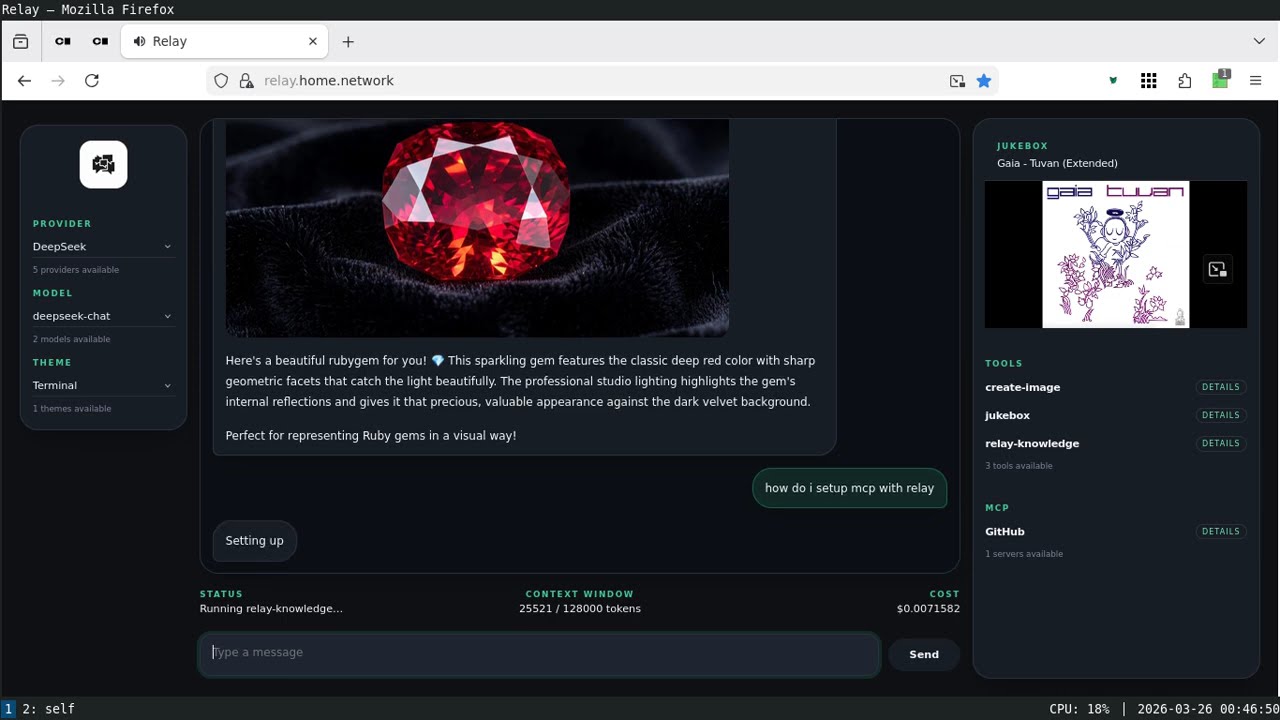
See how these pieces come together in a complete application architecture with Relay, a production-ready LLM application built on llm.rb that demonstrates:
- Context management across requests
- Tool composition and execution
- Concurrent workflows
- Cost tracking and observability
- Production deployment patterns
Watch the screencast: